Getting Started › Opening day
Before you open
A checklist of everything to set up and test before your first service, with links to the pages that cover each one.
Work down this list in the week before you open. Each item links to the page that walks you through it. Everything here is in the back office at login.realpos.net unless it says POS.
The basics
- You can sign in to the back office, and everyone else who needs it has their own login. Sign in to the back office
- Your menu is built and checked: prices, choices, required choices, pizzas, and time-of-day prices. Submit your menu for programming
- Taxes are right: every category has the right tax (or none on purpose), and non-taxable items are marked. Set your tax rate
- Jobs and their security are set. Add jobs and set their security
- Every employee is entered with their PIN, jobs and wages. Enter your employees
- Discounts are set up, and the big ones are marked Secure. Set up discounts
Store settings
- Payment types: cash, cards, gift cards and any others you take (Store Settings > Payments). Payment types
- Gratuities and surcharges, if you add an automatic gratuity for large parties or a surcharge (Store Settings > Gratuities and Surcharges). Gratuities and surcharges
- Void reasons, so staff pick a reason when they void (Store Settings > Void Reasons). Void reasons
- Order types, like Dine In, To Go and Delivery (Menu > Order Types). Order types
- Store close: your Timezone, the End of Day Time your sales reports roll over at, and whether everyone is clocked out at close (Store Settings > Store Close). Store close
- Payroll settings: pay period, overtime rules and how tips are paid (Employees > Settings). Payroll
Your floor and hardware
- Table layout: your dining room, bar and patio, with every table numbered the way your staff know them (Table Layout). Table layout
- Printers and kitchen screens are added, and every item goes to the right one (Hardware > Printers/KDS). Printers and kitchen screens
- Terminals are activated and set up (Hardware > Terminals), and any handhelds are activated. Terminals
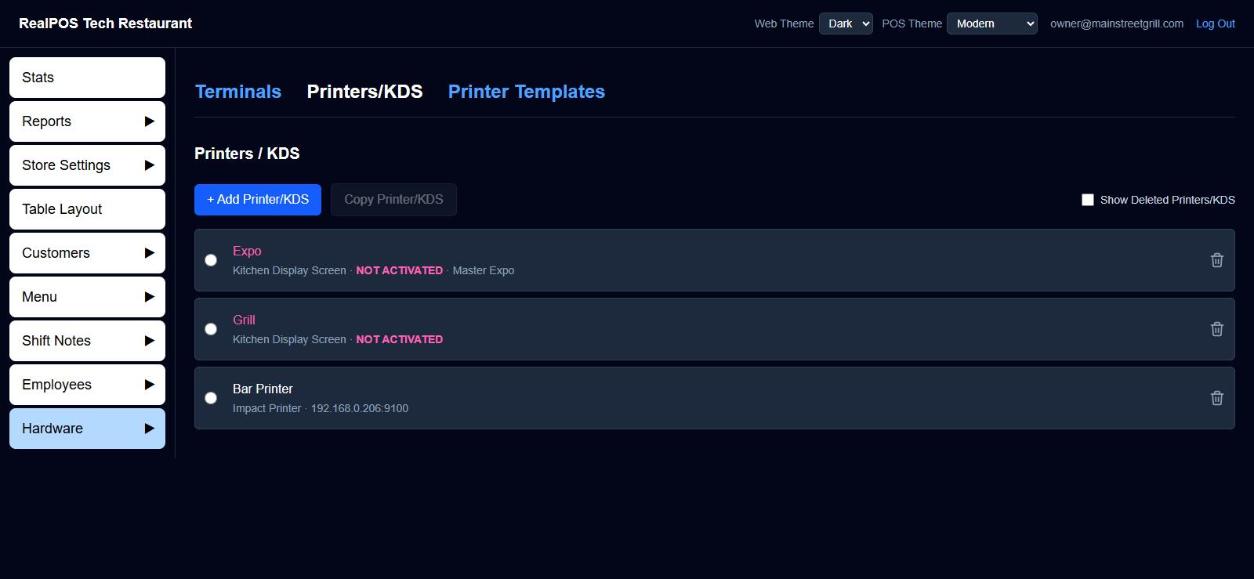 Printers and kitchen screens in the back office
Test everything
Do a full test service a day or two before you open, on the real terminals, printers and kitchen screens:
- Every employee signs in with their own PIN and clocks in. Try something a server's job isn't allowed to do, and check a manager has to step in.
- Ring in an order with an item from every department. Check the prices and the tax on the check.
- Ring in items with required choices, a pizza, and a happy hour item (during happy hour hours, if you have them).
- Send the order and check each item prints or shows up in the right place, with the right name.
- Apply a discount, split a check, and take a cash payment and a card payment.
- Void the test orders when you're done.
- Look at the day's numbers in the back office. Reports
Train your staff
Show each server, bartender, cashier and host how to sign in, clock in, take an order, send it and take payment. The Employee Manual covers each of those step by step, starting with Sign in and Clock in and out.
Need a hand?
Your dealer can help with any of this, or email support@bayareapointofsale.com.